Statistical Accounts let you track non-financial data, such as headcount or square footage, inside Martus. Once enabled, an Admin can define Martus-only statistical accounts and load monthly values for them via file upload, for any Martus integration. The values appear on the Transactions report, flow into actuals, and can be budgeted via Personnel, SPWs, and the budget worksheet.
System Preparation
- Reach out to your Martus support team. Provide the following to them to begin the implementation:
- A sample file for import of actual numbers - this file must include the following:
- Date of transaction (this needs to be the first column)
- Account ID
- Dimension IDs
- Amount
- Note (optional)
- A sample file for import of actual numbers - this file must include the following:
- The Support team will do the following on your behalf:
- Turn on the feature within your Martus instance
- Setup a mapping file on the backend to match the column headers in your sample file to the values within Martus
- Create the first Statistical account in Martus, you will be responsible for adding additional accounts as needed
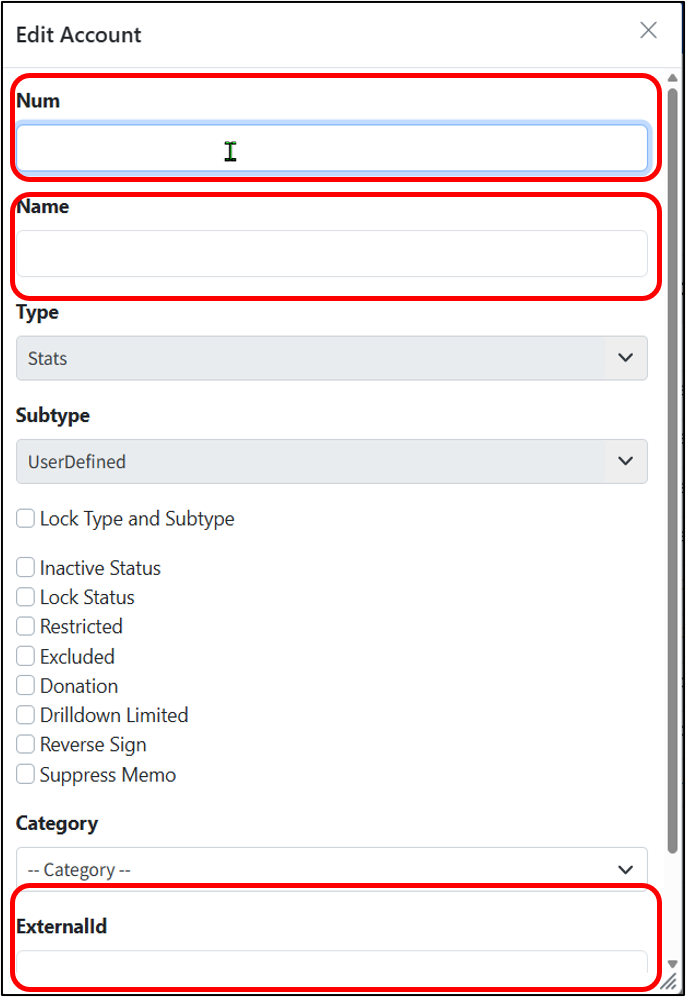
Adding a New Statistical Account
- Go to Setup > Accounts
- Click Add New
- Fill out the Num, account name, and External ID (Num and External ID should match)
- Fill out the Account Category as needed
- Click Save
Uploading Stat Account Transaction Files
- Ensure the file is named: stats_YYYY_MM (Stat_2026_01 = January, 2026)
- Go to Dashboard > Updater
- Choose the file
- Click "Upload"

Notes:
- User defined Stat Accounts will be excluded from Sage Intacct budget uploads and other ERP specific exports within Martus.
- On the Stat file, date and Account number are required on each row.
Was this article helpful?
That’s Great!
Thank you for your feedback
Sorry! We couldn't be helpful
Thank you for your feedback
Feedback sent
We appreciate your effort and will try to fix the article