SPWs become more powerful when utilized with formulas. Formulas can be used in any special purpose worksheet (WSPW, GSPW, TSPW) in order to make updates easier.
Adding Formulas Step by Step
- Click Add Line to create a new line.
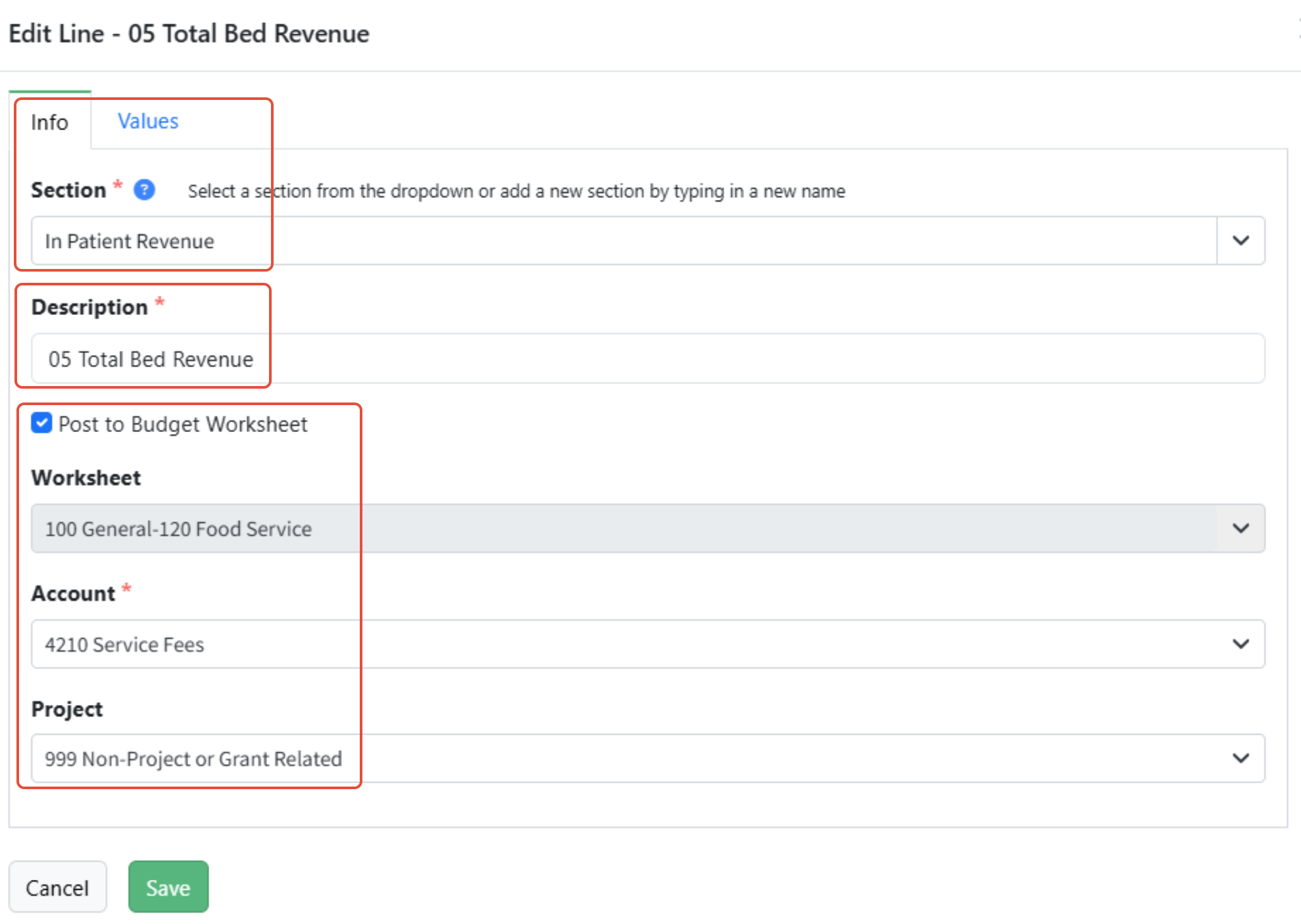
- On the Info tab, choose an existing Section name from the dropdown, or define your own by typing in the Section field.
- Enter a Description for this line of the section. The description must be unique and has a maximum length of 100 characters.
- If this line will be the line that is posted, check Post to Budget Worksheet and specify the Worksheet, Account and any other applicable dimensions. Uncheck Post to Budget Worksheet to stop posting to that worksheet and account.
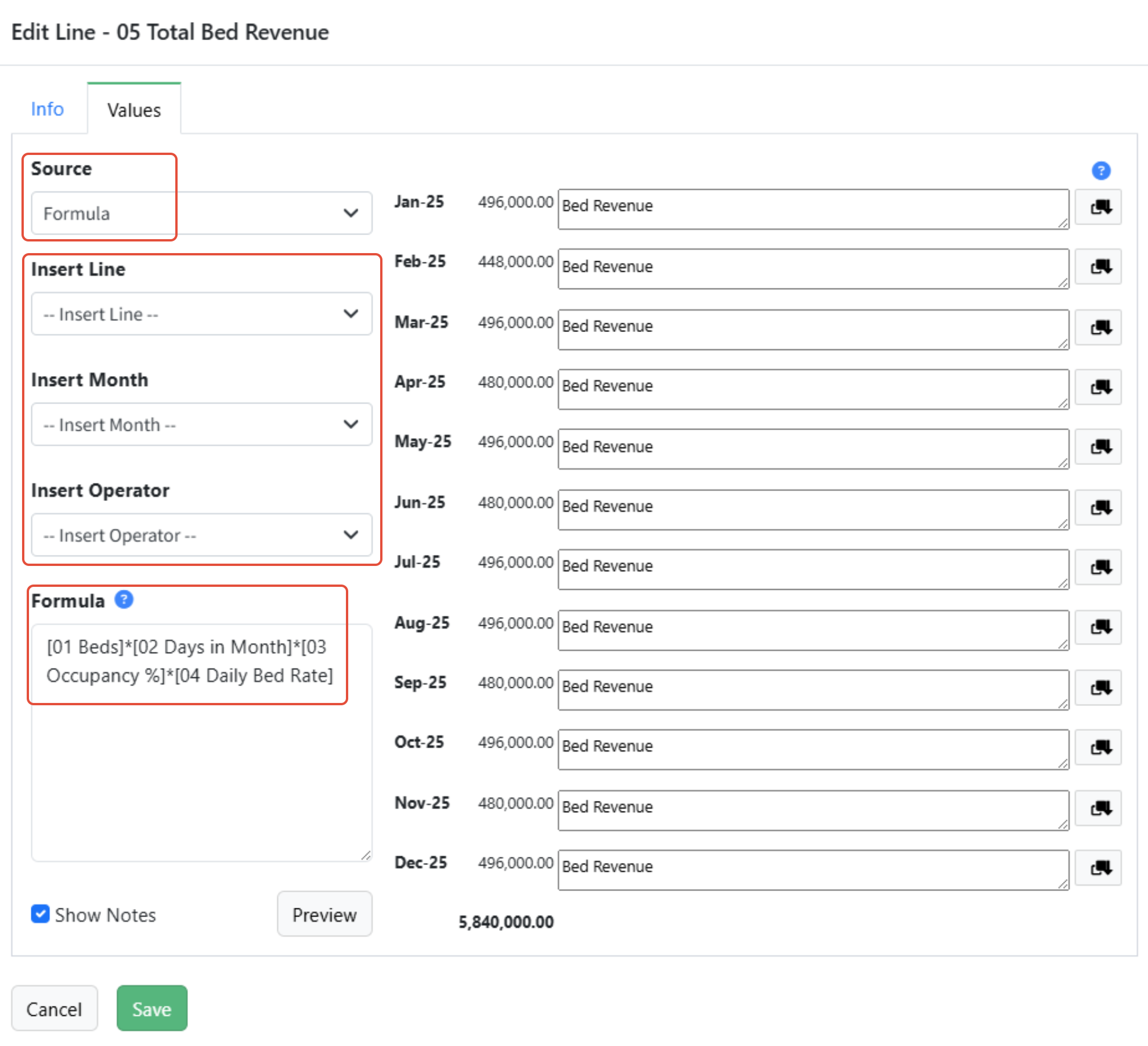
- On the Values tab, choose the source Formula to make calculations.
- Enter the formula in the Formula text box:
- Choose the appropriate line from the Insert Line dropdown, if applicable. All lines from the SPW are shown.
- Choose the appropriate month from the Insert Month dropdown, if applicable. All months are shown. Always concatenate the Line with the Month!
- Choose the appropriate operator from the Insert Operator dropdown, or enter it directly using your keyboard.
- Add any additional lines or operators as needed.
- Click Show Notes to enter any notes desired.
- Click Preview to preview the amounts.
- Click Save to save your changes and close the modal.
Formula Operators
Martus provides a robust selection of operators that can be used within the formula function in an SPW:
- Parentheses () : controls the order of operations
- A * (B + C)
- Asterisk * used for multiplication
- A * B
- Forward Slash / : used for division
- A / B
- Plus Sign + : used for addition
- A + B + C
- Dash - : used for subtraction or to denote a negative number
- A - B
- Caret ^ : used for exponentials
- A^2
- Less-than < : used for logical comparisons of "less than" values (returns 1 if true; 0 if false)
- A < B
- Less-than or Equal-to <= : used for logical comparisons of "less than or equal to" values (returns 1 if true; 0 if false)
- A <= B
- Greater-than > : used for logical comparisons of "greater than" values (returns 1 if true; 0 if false)
- A > B
- Greater-than or Equal-to >= : used for logical comparisons of "greater than or equal to" values (returns 1 if true; 0 if false)
- A >= B
- Double Equal signs == : used as an equality operator to compare and determine if values are equal (returns 1 if true; 0 if false)
- A == B
- Not Equal to != : used as an equality operator to compare and determine if values are not equal (returns 1 if true; 0 if false)
- A != B
- Absolute Value abs() : used to return only positive values
- abs(A) returns the positive value of A
- If Statement if( , , ) : used to return values based on true or false conditions
- if (condition, is true C, is false D)
- Maximum Value max(,) : used to return the largest value from a given set of data
- max (A,B)
- Minimum Value min(,) : used to return the smallest value from a given set of data
- min (A, B)
- Average Value avg(,) : used to calculate the mean or average of a given set of data
- avg (A, B)
- Median Value median(,) : used to return the middle value in a dataset, separating the higher half of values and the lower half of values, not to be mistaken for the mean or average
- median (A, B, C) returns B
- Round round() : used to return values to a specified number of decimal places or digits
- round (A*100)/100 returns two decimals
- Balance(0,[LineName]): calculates a YTD balance of the line plus a starting balance. If no stating balance, enter 0.
- balance (A, B)
- Total([LineName]) : returns the total of the line.
- total (A)
- PriorMonth([LineName], Default) : use the value of the prior month. Use the default value in the first month of the year when there is no prior month.
- priormonth (A, B)
- SectionPlug(): use within a section that should balance to 0 but doesn't.
- Plugline()
For use case examples of formulas in SPWs, check out SPW Formula Examples!
Was this article helpful?
That’s Great!
Thank you for your feedback
Sorry! We couldn't be helpful
Thank you for your feedback
Feedback sent
We appreciate your effort and will try to fix the article