Review the requirements and complete the steps below to set up the Martus integration with MIP.
Requirements
The user in Martus who is going to make the connection to MIP must be an Admin-level user in MIP.
Steps
- In MIP, and Admin user will need to create a Martus User (Administration > Manage Users) with the following permissions:
- User must be Enabled
- MIP
- MIP Web
- View/Read permissions for all Accounting
- Note : If the user is added to a group, that group must have view/read permissions for all settings in MIP
- In MIP, note the following:
- User ID
- User Password
- Database Code (located near the User name or on Administration > Organization Settings > Details)
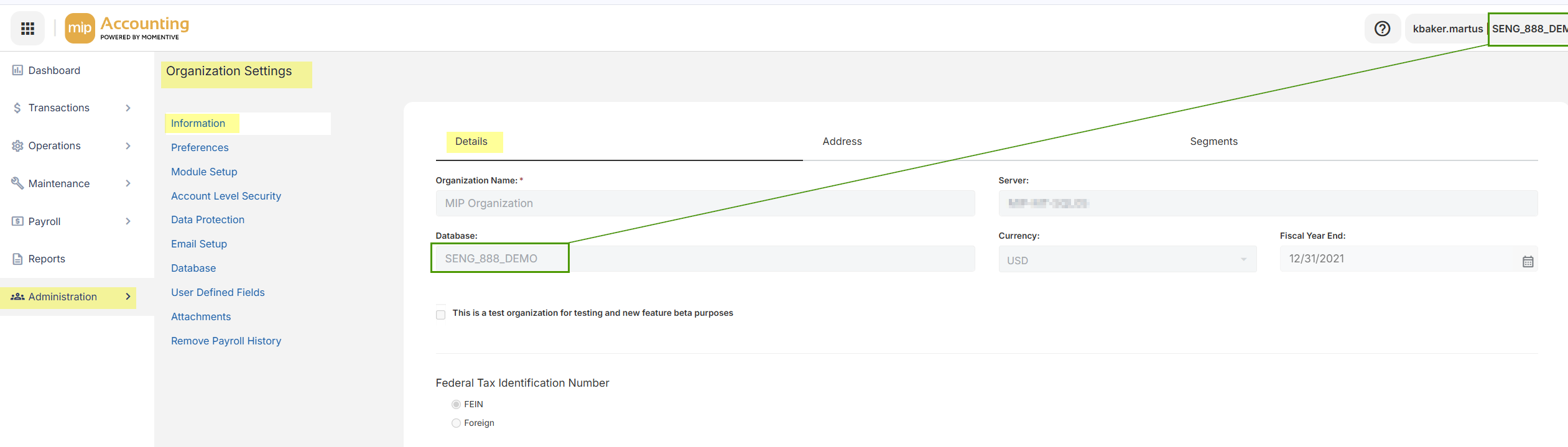
- In Martus, go to Setup > MIP
- Enter User ID
- Enter User Password
- Enter Database Code in the Organization field
- Click Save.
- In Dashboard > Updater, sync the chart of accounts to test the sync. When the sync has been completed and shows successful in the queue below, confirm the accounts synced by going to Setup > Accounts.
- The last step will be to configure dimensions. Please connect with Martus Support to determine the ideal dimension setup.
Was this article helpful?
That’s Great!
Thank you for your feedback
Sorry! We couldn't be helpful
Thank you for your feedback
Feedback sent
We appreciate your effort and will try to fix the article