Integration Documents - MIP Cloud
MIP Cloud - Integration Features and Requirements
The purpose of this document is to list all the specific features of the Martus integration with MIP Cloud, calling out the features that we do support and others we do not, and noting where Martus or MIP Cloud has a particular limitation or requirement.
Overview of Integration Features
The integration includes these features:
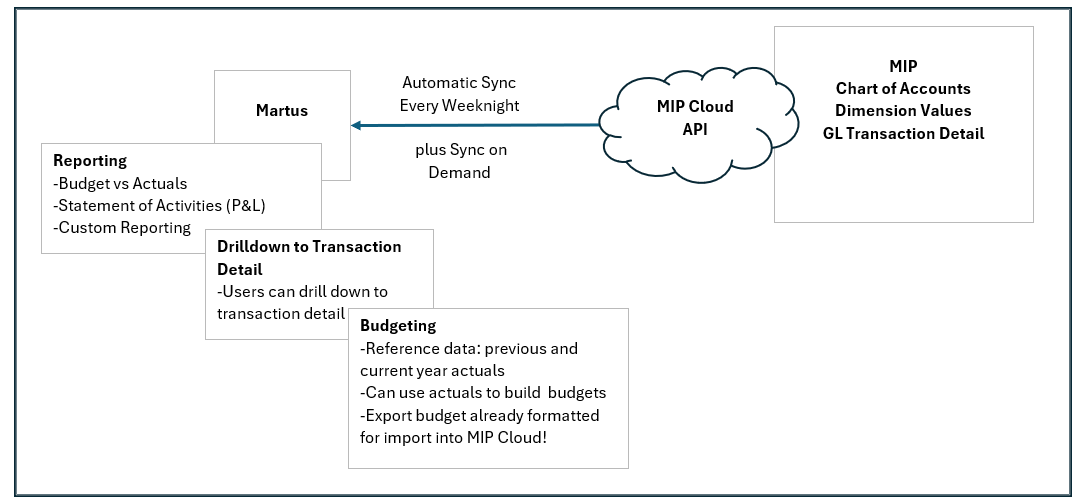
- Sync accounts and dimensions from MIP Cloud – each weeknight via the nightly automated sync and ad hoc.
- Sync GL transactions from the accounting system each weeknight. The nightly sync updates the current and previous two full months. Ad hoc sync is available to allow the manual sync any desired range of months.
- Drilldown in Martus from standard financial reports to see transaction detail.
- Martus' Cash Flow Forecasting is available for MIP Cloud integrations at the Premium subscription level.
- Display of vendor name on transaction detail.
Diagram of Integration Flow and Features
Authorization
Martus access to MIP Cloud is via an MIP user's credentials. An existing MIP cloud user can be repurposed, or one will have to be created for Martus. This user requires a licensed seat. The user must be enabled and must have MIP, MPI Web, and MGMT permissions.
Dimension Setup
As with any Martus configuration, the Implementation Consultant works with the customer to identify the dimensions that are important to budgeting and reporting. (GL accounts are not considered dimensions, within Martus.)
Martus can support whatever segments MIP Cloud uses, up to the Martus maximum of 8 dimensions.
Martus supports multi-entity MIP Cloud companies.
Pulling Budgets from MIP Cloud
Not yet supported.
Syncing Budgets Directly from Martus to MIP Cloud
Coming soon.
Budget Export in an Optimized Format
Budgets can be exported from Martus in an optimized format for MIP Cloud.
Statistical Accounts
Not yet supported.
Display of Attachments
Not yet supported.
Multi-Currency
Not yet supported.
MIP Cloud - Integration Setup
Review the requirements and complete the steps below to set up the Martus integration with MIP.
Requirements
The user in Martus who is going to make the connection to MIP must be an Admin-level user in MIP.
Steps
- In MIP, an Admin user will need to create a Martus User (Administration > Manage Users) with the following permissions:
- User must be Enabled
- MIP
- MIP Web
- View/Read permissions for all Accounting
- Note : If the user is added to a group, that group must have view/read permissions for all settings in MIP
- In MIP, note the following:
- User ID
- User Password
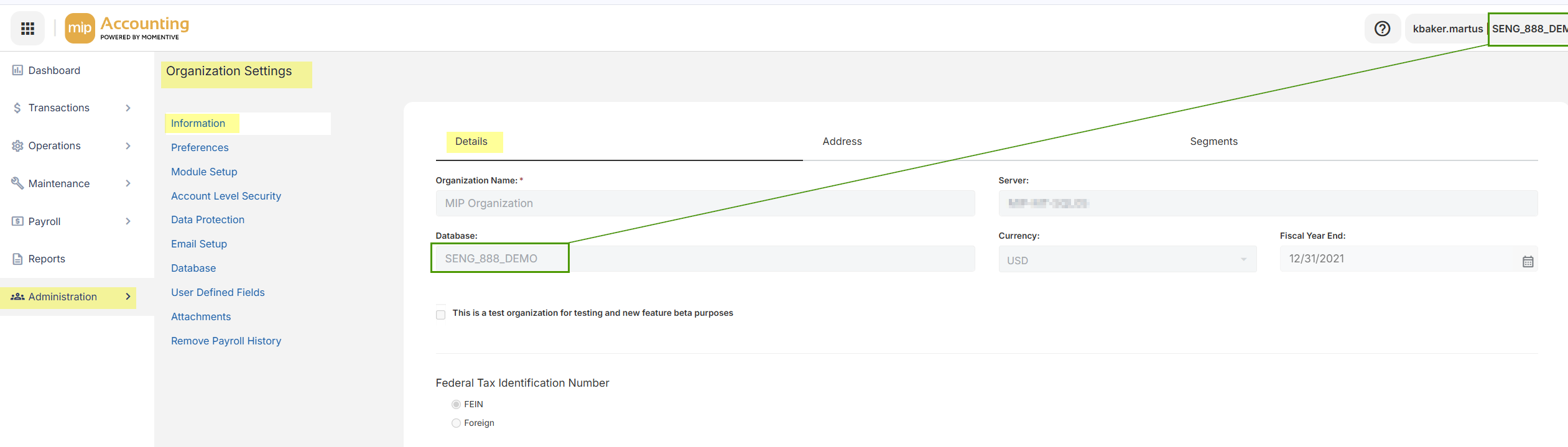
- Database Code (located near the User name or on Administration > Organization Settings > Details)
- In Martus, go to Setup > MIP.
- Enter the User ID.
- Enter the User Password.
- Enter the Database Code in the Organization field.
- Click Save.
- In Dashboard > Updater, sync the chart of accounts to test the sync. When the sync has been completed and shows as successful in the queue below, confirm the accounts synced by going to Setup > Accounts.
- The last step will be to configure dimensions. This is typically done during the kickoff meeting when starting your implementation.