Personnel Budgeting allows for budgeting by position across the organization. Personnel scenarios are built and then pushed to the planner budget when desired. The goal of a scenario is to hold the various assumptions or predictions about the personnel costs for an organization. With multiple scenarios, it is possible to post them to their own scenario budgets and compare them. For example, an organization may want to compare a base scenario to a 3% COLA increase scenario, or this year's personnel costs to last year's.
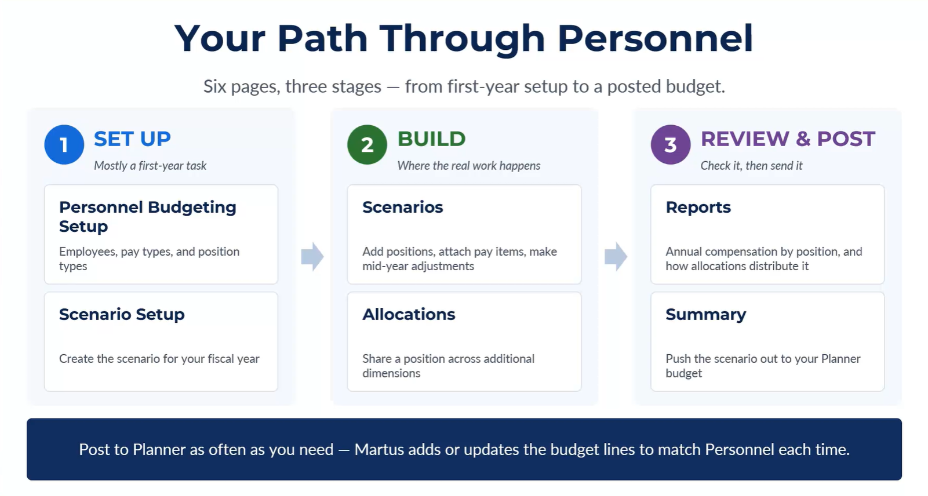
Step One - SET UP - Mostly a first-year task
- Personnel Budgeting Setup > Create the employees, pay types and position types to be used for all personnel budgeting scenarios
- Scenario Setup > Create the scenario for your fiscal year
Step Two - BUILD - Where the real work happens
- Scenarios > Add and edit positions, attach pay items, and make mid-year adjustments
- Allocations > Share a position across additional dimensions
Step Three - REVIEW & POST - Check it, then send it
- Reports > View annual compensation by position, and how allocations distribute it
- Summary > Push the scenario out to your Planner budget when ready
The Scenario Defined
Each scenario is comprised of the configuration settings for that fiscal/calendar year, a set of positions, and an optional allocation. Think of it as a personnel costs mini-budget.
- Annual Setup - Configuration settings on the Annual Setup tab control high-level personnel budgeting information such as the first payroll date of the year and payroll tax information.
- Positions - Personnel scenarios are position-based. Each position is a combination of the following:
- Title - The position title such as Communications Director or Controller.
- Employee - The person who holds this position (this is optional). The employee record consists of:
- Employee Name (First and Last) - The name of the employee.
- Payroll System ID - Used to cross reference Martus with a payroll system for easier import/export functions.
- Anniversary Date - The employee hire date (mm/yyyy), which may be used in calculations on pay types based on the number of months employed.
- Coverages - Used with pay types to determine rates for pay types with tiers such as medical insurance, dental and vision.
- Dimensions - The area of the organization to which this position will be budgeted.
- Pay Items - The various forms of compensation budgeted for this employee. Any pay type can be added to the position. Pay types are organization-specific. Common pay types are:
- Salary pay
- Hourly pay
- Bonus
- Medical insurance
- Dental/vision insurance
- 401k matching
- Cell phone reimbursement
- Allocations - Allocations are an optional component applied to the scenario to distribute pay items for various positions across multiple dimensions, such as when an individual salary is split across two departments.

Was this article helpful?
That’s Great!
Thank you for your feedback
Sorry! We couldn't be helpful
Thank you for your feedback
Feedback sent
We appreciate your effort and will try to fix the article